Compare car rentals near you
Compare car rentals near you
Best car rental deals






Economy and compact cars

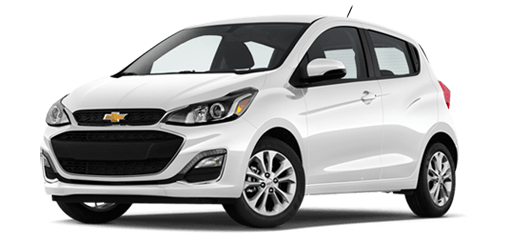
Medium-size cars

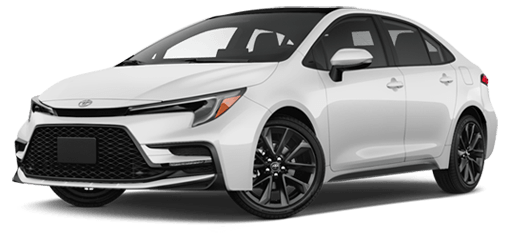
Large cars





Compare rental options
Browse cars and rates from popular rental companies in one place with upfront pricing and no surprises.

Book on your schedule
Reserve a car the same day or plan ahead for up to a month with free cancellation on eligible bookings.
Earn Uber One credits
Members earn Uber One credits every time they rent with Uber.1

Customise your rental
Add available extras to your rental car like bike racks, car seats, ski racks and more.
How to book hire cars with Uber Rent
1. Book your car hire online
To begin your reservation, select the button below to visit Uber Rent online or in the Uber app (you’ll need to be signed in to Uber or create an account). Choose the Rental Cars icon, then enter the address that your hire car pickup/dropoff will be near and the times and dates that your reservation will start and end. Browse vehicles, compare prices and suppliers, and consider including add-ons.
2. Pick up your car hire
Go to the car hire location with your driver’s licence and physical credit card at the time referenced in your reservation in the Uber app. Note that the name on the credit card must match the name on the main car hire driver’s licence.
You’ll also need an additional form of ID, which can be your national ID or a passport if you’re renting a car abroad. Check specific payment methods and document requirements in the reservation T&Cs.
3. Return your car hire
When your reservation is over, return your vehicle to the location indicated in the reservation.
Frequently Asked Questions
Where can I ask a question about Uber Carshare?
Uber Carshare is no longer available. For more information, please go to these pages:
How do I book a rental car with Uber Rent?
To complete your reservation, go to the Uber Rent page, then follow the directions from there.
Is Uber Rent available in my city?
Uber Rent is currently available everywhere in the US, Canada, UK, Spain, Portugal, Germany, Italy, France, Greece, Netherlands, Belgium, Australia and New Zealand. You can use the Uber app or a desktop computer to visit the rent booking page.
From there, you can find a wide range of rental cars near you. Users in the US, Canada, UK, Spain, Portugal, Germany, Italy, France, Greece, Netherlands, Belgium, Australia and New Zealand can also enjoy worldwide booking for travel plans near and far.
How much does it cost to rent a car with Uber Rent?
The cost of your rental car depends on several factors, such as the amount of time you’ll be renting, car size (such as SUV) and market seasonality. By using the Uber app, you can view and compare current prices from several popular rental companies in one place, to conveniently choose the option that fits your needs.
Can I rent a car the same day with Uber Rent?
Yes, with Uber Rent you can use the Uber app to see if there are vehicles available for same-day pick-up. Set your preferred pick-up time and drop-off date and time to see available vehicles near you.
How long can I rent a car with Uber Rent?
You can rent a car for as little as an hour, but a daily fee will be applied. On the other end of the spectrum, you can reserve your rental car for up to 6 months.
What is the minimum age to rent a car with Uber Rent?
You must be at least 21 years old and have held your licence for one year to hire a car with Uber Rent. A Young Driver Fee may apply for drivers under age 25, in addition to the standard car rental rate as determined by the supplier. There may be additional requirements depending on the vehicle and the supplier you select. You can view these requirements in the Terms and Conditions linked in the 'More information' section after you select 'Manage reservation'.
What types of cars can I rent with Uber Rent?
You can find a very diverse range of vehicles on Uber Rent to get the perfect vehicle for your needs. Filter the search results by car size, and explore vehicles such as a BMW 3 Series, Ford Fiesta, Jeep Compass, Kia Soul and much more.
Can I cancel or change my reservation?
Yes, you can cancel your reservation for free and for any reason in before your reservation pickup time when you choose to pay at the counter, when it’s time to pick up your vehicle from the location on your reservation.
To view the rental terms and conditions, select Manage reservation on the 'Upcoming rental' screen in the Uber app, then 'View details' on the 'Your reservations' screen.
Currently, you can only change your reservation in-app, and changes can only be made before the reservation starts.
Can I book now and pay later for my rental car?
Yes, you can book your rental car, then pay at the counter when it’s time to pick up your vehicle from the location on your reservation.
Is it cheaper to rent a car for a week or by the day?
Weekly and daily car rental rates depend on several factors, such as market seasonality, length of rental and car size.
By using the Uber app, you can compare prices from several popular rental companies in one place and conveniently choose the option that fits your needs.
What are common websites for booking rental cars?
There are many commonly used websites and apps for booking rental cars, depending on destination and trip needs. Uber Rent is a convenient option that supports booking both online and in the Uber app, offers access to cars from leading car rental companies and accommodates different trip types, including last-minute and airport rentals.
Top cities in Australia to hire a car with Uber Rent
Australian Capital Territory
Northern Territory
South Australia
Tasmania
Western Australia
Uber is not responsible for the products and/or services offered by third parties or for the terms and conditions (including financial terms) under which those products and services are offered. Uber is not a car hire broker or insurer/insurance intermediary. Uber will also provide the third parties with the data to enable use of their products and services and features that improve the user experience, including users’ country of residence, currency and language, subject to Uber’s Privacy Notice.
1Offer valid for Uber Rent bookings by Uber One members that are reserved before December 31, 2026 and vehicle pickup is completed before December 31, 2026, while supplies last. Offer redeemable only by Uber One members who receive this offer directly from Uber. Uber Rent Terms and Conditions apply. For qualifying transactions, 10% of the value of your Uber Rent reservation, up to $250, not including applicable taxes, will be applied to your account in Uber One credits upon completion, which may take up to 90 days after the rental pickup date. Uber One credits are earned after completion of eligible rentals and cannot be used in countries outside of the country where the vehicle was booked from. Uber One credits expire after 60 days from the day the Uber One credits are provided and cannot be sold, transferred, exchanged or converted to cash. View Uber One credits in the wallet section of your App. Offer is valid while supplies last and is subject to change without notice. Uber One Membership terms also apply.
About
Explore
Airports
Car rentals
Delivery person services
Popular routes
Taxis