November 20, 2014
Take a ride with Diplo and Uber, only in LA
MS
Molly Spaeth
Share this article
On Monday we revealed how you can now play your Spotify music when you ride with Uber.
Tomorrow, fans in Los Angeles have the chance to be picked up and driven around by Diplo. Yes, you read that right!
REQUEST THE CHANCE TO RIDE WITH DIPLO
HOW DO YOU TAKE PART?
- Connect your Spotify account from the Uber Profile screen. You only need to do this once. (Don’t have Spotify Premium? No problem! See below for details.)
- Open up the Uber app at 2 pm on Friday, November 21.
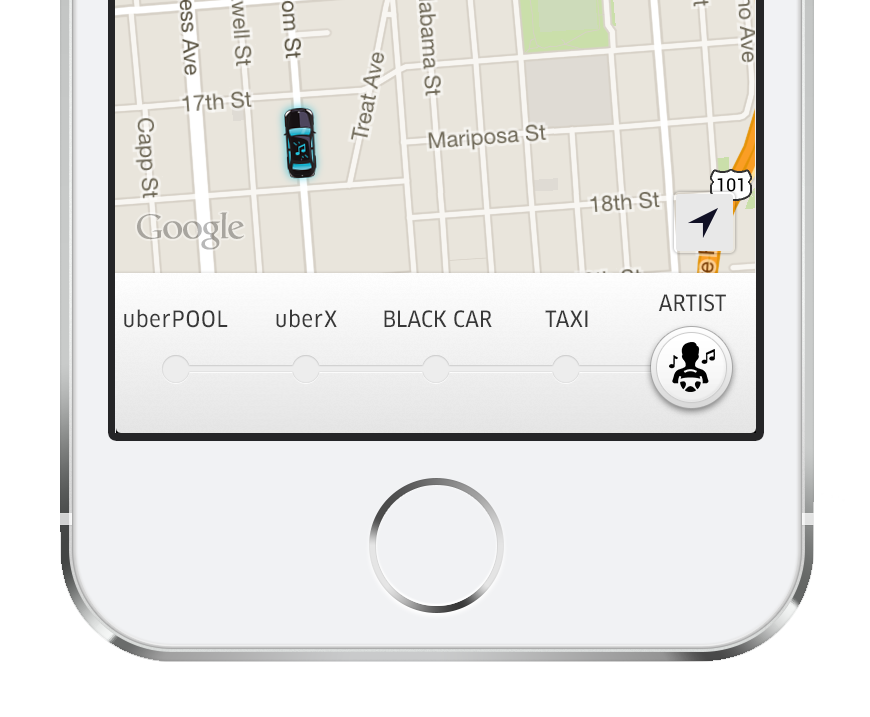
- Request the special vehicle option. Tap the music bar and choose a song from any of your Spotify playlists while you wait for your Uber to arrive.
- If your ride is confirmed, you and as many of your friends that can safely fit will be some of the first to experience the new Spotify-enabled Uber. And if you’re really lucky, get ready for the ride of your life with Diplo!
ALL THE DETAILS:
- Music is available for Spotify Premium users. Don’t have Premium? No problem. We’ve arranged with Spotify to provide you with a free week of Premium; no credit card required and no obligations at the end of the week. If you are eligible, your trial will start when you take your first music ride.
- On Android? The Uber in-app music experience is coming soon, but you can still control your music through the Spotify app. After connecting your Spotify Premium account to Uber, tap the music bar to jump over to Spotify. Once your ride starts, tap the Now Playing bar in Spotify. Then tap the Connect icon and select “Uber Partner”. The music you choose will play through your Uber’s speakers.
Category
Related Articles
6 articles
Autonomous
Company News
Rides
September 2, 2026
Company News
Merchants and Restaurants
Rides
June 16, 2026