How to see payments status in the Uber Freight app
Keeping an eye on your payments is vital to running a successful business. That’s why we make it simple for carriers to track the current payment status on a load with the Uber Freight app.
With just a few taps, you can see the status of all your payments—linehaul, detention, and lumper. What’s more, you can also find the status of your documentation to see if it’s missing, in process, or has been approved.
Below, we show you just how easy it is to learn the payment status on your loads.

See payments
To see the payment status on a load, click “See payment” on its load details page.

View current status
The next screen displays the current status. In this example, the load has been delivered. The proof of delivery has been uploaded by the carrier, but the lumper receipt is missing. To add a missing document, click the “Upload” button and follow the directions.

Load payment
If a load has been paid, you will see the date the payment(s) was sent. If you have any questions about payments from Uber Freight, tap “Learn more.”
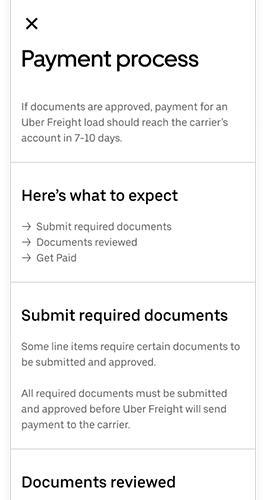
Payment FAQ
The in-app FAQ offers more information about the payment process. Additionally, you can find more information in our Carrier Payment and Accessorials Guide.
Combining technology from the Uber ride-sharing platform and logistics experience from across the globe, we’re opening new efficiencies for carriers. To see all the advantages Uber Freight offers, sign up today.
Uber Freight