Car rentals at Muskegon County Airport (MKG)
Browse vehicles from popular rental car companies at Muskegon County Airport with Uber Rent. From electric cars and sedans to SUVs, you’ll find vehicles fit for solo travelers and for groups with up to 7 people. Enter your time and location details to find car rentals available to book at MKG.
Car rentals at Muskegon County Airport (MKG)
Browse vehicles from popular rental car companies at Muskegon County Airport with Uber Rent. From electric cars and sedans to SUVs, you’ll find vehicles fit for solo travelers and for groups with up to 7 people. Enter your time and location details to find car rentals available to book at MKG.
Browse the best car rental deals at Muskegon County Airport
Uber Rent simplifies your quest for car rental deals at MKG Airport, ensuring a seamless experience for travelers like you. Whether reserving through the Uber app or online, effortlessly compare top-notch vehicles from well-known brands and secure your rental reservation in seconds.
Explore a variety of vehicles, from sedans to SUVs, and enjoy the flexibility of booking on the same day or the peace of mind that comes with planning ahead.
Opt for the convenience of an airport car rental whether you’re on a business trip or a leisurely adventure.
Whatever your needs, make the journey as memorable as the destination by booking a rental car at Muskegon County Airport with Uber Rent today.
Reasons to rent a car with Uber Rent
Same-day rental cars
Book your car rental for same-day travel whether you’re boarding a plane or landing at MKG Airport.* Uber Rent allows you to plan your transportation on the go, making sure you’re ready to hit the road as soon as you arrive.
Seamless reservations
Booking rental cars at Muskegon County Airport is as easy as requesting a ride with Uber. You can compare rental cars from the rental companies available at MKG and complete your reservation in the Uber app or online.
Extensive vehicle options
For the family searching for a comfortable van, the business professional in need of a stylish ride, and more, consider Uber Rent. Browse the best car rental deals from well-known local companies to accommodate your preferences and budget. There’s something for everyone.
Most popular rental cars in Grand Rapids
Below are some of the most commonly available rental cars. Actual vehicles will depend on rental agency inventory.
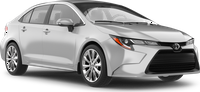
Toyota Corolla or similar
Midsize sedan
Room for up to 5 people
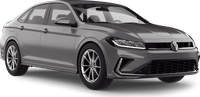
Volkswagen Jetta or similar
Standard sedan
Room for up to 5 people
Toyota Corolla
Midsize sedan
Room for up to 5 people
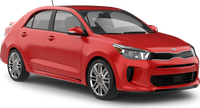
Kia Rio
Economy
Room for up to 5 people
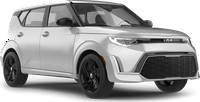
Kia Soul
Compact
Room for up to 5 people
Volkswagen Jetta
Standard sedan
Room for up to 5 people
Toyota Camry
Full-size SUV
Room for up to 5 people
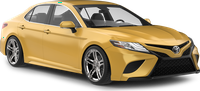
Kia Soul or similar
Compact
Room for up to 5 people
Toyota Camry or similar
Full-size SUV
Room for up to 5 people
The best rental cars for your Grand Rapids trip
Grand Rapids offers a variety of attractions for visitors who choose to rent a car. From cultural landmarks to natural beauty, the city provides a wide range of experiences. Renting a car allows for convenient access to these points of interest, making it easier to explore at one's own pace. Whether interested in art, history, or outdoor activities, there is something for everyone to enjoy.
What type of car should I rent?
- Compact cars are suitable for navigating downtown areas and visiting places like the Grand Rapids Art Museum.
- SUVs are ideal for trips to Frederik Meijer Gardens & Sculpture Park, offering more space for passengers and any outdoor gear.
- Sedans provide a comfortable ride for longer drives to nearby attractions such as the John Ball Zoo.
- Convertibles can enhance the experience of scenic drives along the Grand River.
What cars are recommended for different times of the year?
- In winter, an all-wheel-drive vehicle is recommended for handling snowy conditions.
- During summer, a convertible can be enjoyable for open-air drives.
- Spring and fall are well-suited for sedans or SUVs, providing comfort and space for varying weather conditions.
Find the best car rental deals from top brands
With Uber Rent, you can rent a car from different companies at Muskegon County Airport, such as Budget, Avis, and Hertz.
Go to the Uber app or online to see companies offering rentals at MKG Airport.

Budget

Avis

Hertz
How to book rental cars with Uber Rent
Reserve your rental car
Select the button below to access the Rent booking page online or in the Uber app. Enter your pickup and dropoff details to view vehicle options at Muskegon County Airport. From there, complete your reservation. You can pay in advance or, where available, at the counter at the time of pickup.
Pick up your rental car
Head to the location at the date and time listed on your reservation in the Uber app. Remember to take your driver’s license and a physical credit card.
Drop off your rental car
Return the rental car at the dropoff location listed in your reservation. Your reservation can be found in the Uber app and is also sent to the email address associated with your Uber account.
Frequently asked questions
- What are the requirements to rent a car with Uber Rent at Muskegon County Airport?
While the minimum age to use Uber Rent is 18 years old, there may be different age requirements depending on the vehicle you choose and which supplier you rent from. Extra fees might apply if you’re under 25 years old. When creating a new reservation, you can access the rental terms and conditions by selecting the deal on the “Choose your car” screen in the Uber app. Under “More information,” select FAQs to find details about the minimum driving age.
For an existing reservation, you can access the rental terms and conditions by selecting Manage reservation on the “Upcoming rental” screen in the Uber app, then View details on the “Your reservations” screen.
- Can I cancel or change my reservation at MKG Airport?
You can cancel your reservation at Muskegon County Airport in the Uber app up to 48 hours before your pickup time. After that, you may be charged a cancellation fee. Fees and rules depend on the supplier.
You can also change your reservation up to 48 hours before your pickup time, but pricing and availability aren't guaranteed.
To view the rental terms and conditions, select the deal on the “Choose your car” screen in the Uber app. Under “More information,” select FAQs to find details about cancellation policy.
For your existing reservation, select Manage reservation on the “Upcoming rental” screen in the Uber app, then Terms and Conditions on the “Your reservations” screen.
- What payment methods does Uber Rent accept at MKG Airport?
You can pay in the app by using one of the available Uber payment methods. Additional fees like insurance are paid at the rental location. Check with the rental supplier of your choice about what payment methods they’ll accept for extra fees.
- Do I need to refill the gas before returning a non-electric rental car booked with Uber Rent at MKG Airport?
To view the rental terms and conditions, such as whether you need to refill the gas in your rental car, select the deal on the “Choose your car” screen in the Uber app. Under “More information,” select FAQs to find details on refilling the gas.
For your existing reservation, choose Manage reservation on the “Upcoming rental” screen in the Uber app, then Terms and Conditions on the “Your reservations” screen.
- Can I add another driver to my rental reservation with Uber Rent at MKG Airport?
The conditions of adding another driver to your rental may vary per rental company. Select the deal on the “Choose your car” screen in the Uber app. Under “More information,” select FAQs to find details about additional drivers.
For your existing booking, check the Terms and Conditions section after you choose Manage reservation on the “Upcoming rental” screen in the Uber app to see what conditions apply for your specific rental.
- Do I need my own insurance to rent a car at MKG Airport with Uber Rent?
No, you don’t need to already have your own personal car insurance to rent a car from our partners with Uber Rent. When you arrive at the rental location to pick up your vehicle, the rental company can offer several types of car rental insurance plans and protection products to help protect you in case of an accident.
- What is Uber Rent?
Uber Rent helps people reserve rental cars from our partners directly through the Uber app or online. We partner with third-party vehicle companies so you get a great selection of cars and prices at Muskegon County Airport.
- What car rental companies can I rent a car from at Muskegon County Airport?
At MKG Airport, you can rent a car from Budget, Avis, and Hertz, among others.
- How do I rent a car with Uber Rent at Muskegon County Airport?
To reserve your rental car from our partners with the Uber app, select the Rental Cars tile, followed by Find cars on the next screen, to begin your reservation. To reserve a rental car online, visit the Uber Rent booking page and follow the directions to complete your reservation.
- How much does it cost on average to rent a car at MKG Airport with Uber Rent for a week?
It costs on average $488/week to rent an economy vehicle from our partners at Muskegon County Airport with Uber Rent. Please consider that car size, market seasonality, and length of reservation are a few factors that can affect the average rental car price.
- How much does it cost on average to rent a car at MKG Airport with Uber Rent per day?
It costs on average $70/day to rent an economy vehicle from our partners at Muskegon County Airport with Uber Rent if you rent for a week. Please consider that car size, market seasonality, and length of reservation are a few factors that can affect the average rental car price.
- Can I reserve a rental car the same day with Uber Rent at MKG Airport?
Yes, you can reserve a rental car with our partners the same day with Uber Rent at Muskegon County Airport. Enter your pickup and dropoff details online or in the Uber app to view available car rentals at the airport.
- Can I rent a car long term at MKG Airport with Uber Rent?
With Uber Rent, you can rent a car from our partners at MKG for a maximum of 30 days. Rental terms may vary depending on the rental company. To check availability and find vehicles that match your search criteria for long-term rentals, enter your desired dates online or in the Uber app.
- Where do I pick up my car at MKG Airport?
Some companies have their rental cars available just outside the airport, while others may require a short shuttle ride to reach the rental location. When making your reservation in the Uber app or online, be sure to check the location details for the rental company of your choice.
*Renting a car from our partners with Uber Rent is currently available if you're based in Australia, Belgium, Canada, France, Germany, Greece, Italy, Mexico, New Zealand, Portugal, Spain, the Netherlands, the United Kingdom, or the United States. You can book a rental car for travel in other countries before your trip. Once you're in a country where Uber Rent isn't available, you won't be able to make a new reservation, but you can still view and manage any reservation you made before traveling.