Uber App Pro Tips
Here are some PRO tips to help you get the most from your Uber app.
MANAGE YOUR ACCOUNT
Log in online with your Uber account details to riders.uber.com, to manage your profile, payment methods, see a history of all your trips and download invoices.
FARE ESTIMATE
Get a fare estimate in the app before you ride. Before you request a ride, click ‘Fare Estimate’ and input your destination to see an estimated fare for your journey.
SPLIT YOUR FARE
Invite your mates to chip in by using ‘Fare Split‘ while you ride. When in a trip, click ‘Fare Split’ and share the fare with your friends. Your fare will be split equally.
SHARE YOUR ETA
Running late? Let people know. Click ‘Share My ETA‘ while you ride. This will create a shareable link via SMS so that you can let others know exactly when you’ll arrive.
LOST AND FOUND
Left your phone, sunglasses or shopping bags with your driver in the car? No problem at all! Log in at riders.uber.com/lost and we’ll assist you to contact the driver.
SURGE DROP
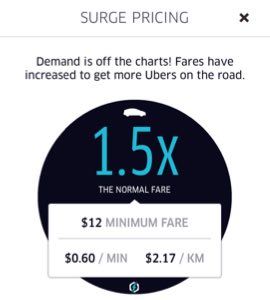
If you don’t need to ride immediately, you can wait for surge to drop. Just click ‘Notify me if surge ends’ to be notified when prices return to normal. You will always be notified in the app before you request your ride.
Below is an example of the surge pricing screen you may see.
Now you’re ready to ride like a PRO!
Uber On.