Uber it to the Tamil Nadu Global Investors Meet 2015
Take a free Uber ride to the Tamil Nadu Global Investors Meet, September 8-10th 2015
ENTER THE PROMO CODE
TO GET A FREE RIDE WORTH INR 400!
(VALID TO/FROM THE CHENNAI TRADE CENTER & LEELA PALACE | VALID FROM SEPTEMBER 8-12TH)
Welcome to Chennai! Uber is excited to partner with the 2015 Tamil Nadu Global Investors Meet (GIM) to make sure you have a safe, reliable, and affordable way to get to and from your accommodation to the Chennai Trade Center or the Leela Palace.
Since February 28, 2014, we’ve been working to make Uber the most reliable way to get around. The Uber platform allows safe and reliable rides to happen at all hours of the day, supporting and extending Chennai’s public transportation system.
If you don’t have the Uber app on your smartphone, you can download it from the Google Play Store or Apple App Store.

What cars does Uber Chennai have on the system?
Uber’s goal is to get you a high quality ride as quickly as possible. To do that we need to work with a range of vehicles that are spacious and provide a great ride. The different kinds of cars on the Uber Chennai platform include
| Product | Fare | Vehicle Type |
|---|---|---|
| uberGO | Base Fare of INR 40 + INR 8/km + INR 1/Minute | Tata Indica, Toyota Etios Liva and Ford Figo |
| uberX | Base Fare of INR 40 + INR 9/km + INR 1/Minute | Toyota Etios, Mahindra Verito, and Maruti Suzuki Swift DZire |
| UberBlack | Base Fare of INR 100 + INR 18/km + INR 2/Minute | Toyota Innova, Toyota Corolla Altis and Toyota Camry |
As a rider, your request is sent to the nearest available car. All the drivers and cars on the system are licensed professionals, and start driving only after going through a stringent quality process. If you ever feel that a specific vehicle is subpar quality, please do let us know.
Could you share some sample fares from or to The Chennai Trade Center?
| Area | Sample uberGO Fare (in INR) | Sample uberX Fare (in INR) | Sample UberBlack Fare (in INR) |
|---|---|---|---|
| Airport | 220-250 | 230-260 | 370-432 |
| The Leela Palace | 145-180 | 148-184 | 320-390 |
| Adyar | 120-160 | 135-170 | 280-340 |
| Anna Nagar | 160-210 | 175-220 | 370-460 |
| Guindy | 90-105 | 95-110 | 200-240 |
| Nungambakkam | 140-175 | 150-190 | 320-400 |
| Egmore | 170-220 | 185-235 | 390-490 |
Where can Uber be used in the city?
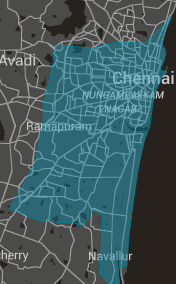
Uber can be used anywhere within Chennai city limits (including the airport). We currently do not service areas outside Chennai, especially places like Mahabalipuram, Sriperambudur and Pondicherry.
Could you explain the new safety features which have been added?
Sure! Our commitment to safety means we’re always working to make riding with Uber a safe and dependable way to get around. As part of that commitment, we are always seeking to improve our safety technologies and processes.
Over the last few months, we launched a number of key safety initiatives in India, including re-verification of all driver partners with the police, additional background screening with First Advantage, and the establishment of a dedicated local Incident Response Team to handle critical situations.
SEND STATUS: SHARING YOUR JOURNEY WITH FRIENDS & FAMILY
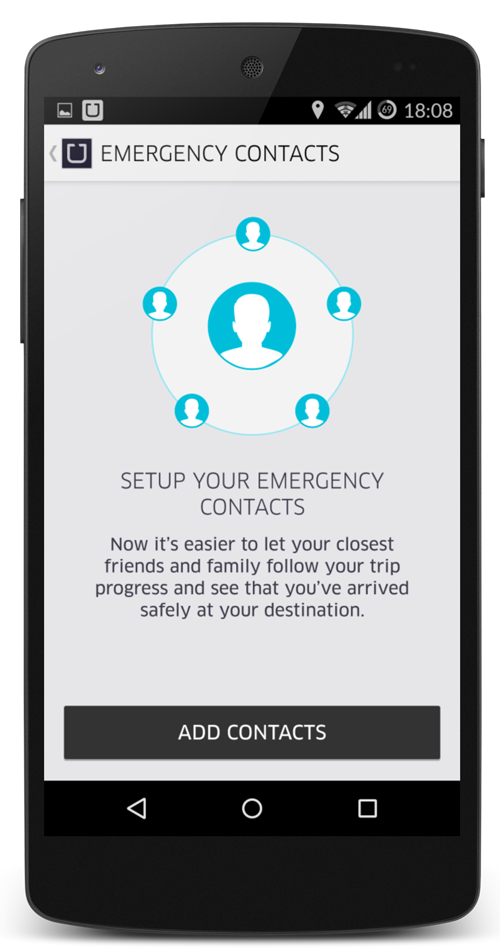
We’ve added a new feature, Send Status, that builds on and replaces Share my ETA. Send Status enables riders to share details about their driver and vehicle – including live GPS tracking, driver photo, name and vehicle license number – with family and friends.
With this new feature, riders can also send trip details to up to five pre-selected contacts with just two taps of a button. Send Status makes it even easier for friends and family to pinpoint your exact location and track trip progress in real time — from start to finish.
Here’s how to quickly “Send Status” to a pre-selected group of your family and friends:
- Set up your list of contacts
In the Uber app settings, you can select up to 5 of your preferred contacts - Request a ride as usual
- Before your driver arrives or at any point during your journey, tap ‘Send Status’
Your pre-selected list of contacts will receive a link to view your trip status live as soon as you hit send (no SMS fees charged). You can also add additional contacts to share your trip details with at this point.

SOS
We have also added an SOS button directly in-app so riders can immediately contact local authorities in the rare event of an emergency.
How it works:
- In case of an emergency, tap SOS in the top right of the screen
- Confirm the call to automatically dial local authorities (‘100’)
You can check out some more frequently asked questions here.
As always, feel free to reach out via email (support.chennai@uber.com) or on Twitter (@Uber_Chennai) if you have any questions!
Love,
Team Uber Chennai