Car rentals at Red Deer Regional Airport (YQF)
Browse vehicles from popular rental car companies at Red Deer Regional Airport with Uber Rent. From electric cars and sedans to SUVs, you’ll find vehicles fit for solo travelers and for groups with up to 7 people. Enter your time and location details to find car rentals available to book at YQF.
Car rentals at Red Deer Regional Airport (YQF)
Browse vehicles from popular rental car companies at Red Deer Regional Airport with Uber Rent. From electric cars and sedans to SUVs, you’ll find vehicles fit for solo travelers and for groups with up to 7 people. Enter your time and location details to find car rentals available to book at YQF.
Browse the best car rental deals at Red Deer Regional Airport
Uber Rent simplifies your quest for car rental deals at YQF Airport, ensuring a seamless experience for travelers like you. Whether reserving through the Uber app or online, effortlessly compare top-notch vehicles from well-known brands and secure your rental reservation in seconds.
Explore a variety of vehicles, from sedans to SUVs, and enjoy the flexibility of booking on the same day or the peace of mind that comes with planning ahead.
Opt for the convenience of an airport car rental whether you’re on a business trip or a leisurely adventure.
Whatever your needs, make the journey as memorable as the destination by booking a rental car at Red Deer Regional Airport with Uber Rent today.
Reasons to rent a car with Uber Rent
Same-day rental cars
Book your car rental for same-day travel whether you’re boarding a plane or landing at YQF Airport.* Uber Rent allows you to plan your transportation on the go, making sure you’re ready to hit the road as soon as you arrive.
Seamless reservations
Booking rental cars at Red Deer Regional Airport is as easy as requesting a ride with Uber. You can compare rental cars from the rental companies available at YQF and complete your reservation in the Uber app or online.
Extensive vehicle options
For the family searching for a comfortable van, the business professional in need of a stylish ride, and more, consider Uber Rent. Browse the best car rental deals from well-known local companies to accommodate your preferences and budget. There’s something for everyone.
Most popular rental cars in Red Deer
Below are some of the most commonly available rental cars. Actual vehicles will depend on rental agency inventory.
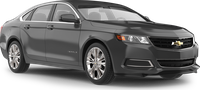
Chevrolet Impala or similar
Standard sedan
Room for up to 5 people
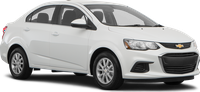
Chevrolet Sonic or similar
Compact
Room for up to 5 people
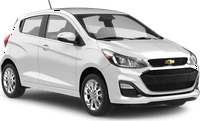
Chevrolet Spark or similar
Economy
Room for up to 5 people
Hyundai Elantra or similar
Midsize sedan
Room for up to 5 people

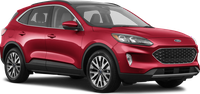
Ford Escape or similar
Mid-size SUV
Room for up to 5 people
The best rental cars for your Red Deer trip
Red Deer offers a variety of attractions and activities for visitors who choose to rent a car. With its parks, museums, and cultural sites, there is something for everyone to enjoy. Renting a car provides the flexibility to explore the city and its surroundings at your own pace, making it easier to visit multiple points of interest.
What type of car should I rent?
- For visiting Waskasoo Park, a compact car is suitable due to easy parking and short travel distances.
- If planning to explore the Alberta Sports Hall of Fame, a standard sedan offers comfort for the drive.
- For trips to the Kerry Wood Nature Centre, an SUV might be beneficial for carrying outdoor gear.
- A luxury car could enhance the experience when visiting the Red Deer Museum and Art Gallery.
- For family outings to Discovery Canyon, a minivan provides ample space for passengers and equipment.
What cars are recommended for different times of the year?
- In winter, an all-wheel-drive vehicle is recommended for navigating snowy and icy roads.
- During summer, a convertible can offer an enjoyable experience for scenic drives.
- In spring and fall, a fuel-efficient sedan is practical for moderate weather conditions.
- For those planning outdoor activities, an SUV or crossover is versatile for carrying gear.
- For business trips, a luxury sedan can provide comfort and style.
Find the best car rental deals from top brands
With Uber Rent, you can rent a car from different companies at Red Deer Regional Airport, such as Avis, Hertz, and Budget.
Go to the Uber app or online to see companies offering rentals at YQF Airport.

Avis

Hertz

Budget
How to book rental cars with Uber Rent
Reserve your rental car
Select the button below to access the Rent booking page online or in the Uber app. Enter your pickup and dropoff details to view vehicle options at Red Deer Regional Airport. From there, complete your reservation. You can pay in advance or, where available, at the counter at the time of pickup.
Pick up your rental car
Head to the location at the date and time listed on your reservation in the Uber app. Remember to take your driver’s license and a physical credit card.
Drop off your rental car
Return the rental car at the dropoff location listed in your reservation. Your reservation can be found in the Uber app and is also sent to the email address associated with your Uber account.
Frequently asked questions
- What are the requirements to rent a car with Uber Rent at Red Deer Regional Airport?
While the minimum age to use Uber Rent is 18 years old, there may be different age requirements depending on the vehicle you choose and which supplier you rent from. Extra fees might apply if you’re under 25 years old. When creating a new reservation, you can access the rental terms and conditions by selecting the deal on the “Choose your car” screen in the Uber app. Under “More information,” select FAQs to find details about the minimum driving age.
For an existing reservation, you can access the rental terms and conditions by selecting Manage reservation on the “Upcoming rental” screen in the Uber app, then View details on the “Your reservations” screen.
- Can I cancel or change my reservation at YQF Airport?
You can cancel your reservation at Red Deer Regional Airport in the Uber app up to 48 hours before your pickup time. After that, you may be charged a cancellation fee. Fees and rules depend on the supplier.
You can also change your reservation up to 48 hours before your pickup time, but pricing and availability aren't guaranteed.
To view the rental terms and conditions, select the deal on the “Choose your car” screen in the Uber app. Under “More information,” select FAQs to find details about cancellation policy.
For your existing reservation, select Manage reservation on the “Upcoming rental” screen in the Uber app, then Terms and Conditions on the “Your reservations” screen.
- What payment methods does Uber Rent accept at YQF Airport?
You can pay in the app by using one of the available Uber payment methods. Additional fees like insurance are paid at the rental location. Check with the rental supplier of your choice about what payment methods they’ll accept for extra fees.
- Do I need to refill the gas before returning a non-electric rental car booked with Uber Rent at YQF Airport?
To view the rental terms and conditions, such as whether you need to refill the gas in your rental car, select the deal on the “Choose your car” screen in the Uber app. Under “More information,” select FAQs to find details on refilling the gas.
For your existing reservation, choose Manage reservation on the “Upcoming rental” screen in the Uber app, then Terms and Conditions on the “Your reservations” screen.
- Can I add another driver to my rental reservation with Uber Rent at YQF Airport?
The conditions of adding another driver to your rental may vary per rental company. Select the deal on the “Choose your car” screen in the Uber app. Under “More information,” select FAQs to find details about additional drivers.
For your existing booking, check the Terms and Conditions section after you choose Manage reservation on the “Upcoming rental” screen in the Uber app to see what conditions apply for your specific rental.
- Do I need my own insurance to rent a car at YQF Airport with Uber Rent?
No, you don’t need to already have your own personal car insurance to rent a car from our partners with Uber Rent. When you arrive at the rental location to pick up your vehicle, the rental company can offer several types of car rental insurance plans and protection products to help protect you in case of an accident.
- What is Uber Rent?
Uber Rent helps people reserve rental cars from our partners directly through the Uber app or online. We partner with third-party vehicle companies so you get a great selection of cars and prices at Red Deer Regional Airport.
- What car rental companies can I rent a car from at Red Deer Regional Airport?
At YQF Airport, you can rent a car from Avis, Hertz, and Budget, among others.
- How do I rent a car with Uber Rent at Red Deer Regional Airport?
To reserve your rental car from our partners with the Uber app, select the Rental Cars tile, followed by Find cars on the next screen, to begin your reservation. To reserve a rental car online, visit the Uber Rent booking page and follow the directions to complete your reservation.
- How much does it cost on average to rent a car at YQF Airport with Uber Rent for a week?
It costs on average CA$452/week to rent an economy vehicle from our partners at Red Deer Regional Airport with Uber Rent. Please consider that car size, market seasonality, and length of reservation are a few factors that can affect the average rental car price.
- How much does it cost on average to rent a car at YQF Airport with Uber Rent per day?
It costs on average CA$65/day to rent an economy vehicle from our partners at Red Deer Regional Airport with Uber Rent if you rent for a week. Please consider that car size, market seasonality, and length of reservation are a few factors that can affect the average rental car price.
- Can I reserve a rental car the same day with Uber Rent at YQF Airport?
Yes, you can reserve a rental car with our partners the same day with Uber Rent at Red Deer Regional Airport. Enter your pickup and dropoff details online or in the Uber app to view available car rentals at the airport.
- Can I rent a car long term at YQF Airport with Uber Rent?
With Uber Rent, you can rent a car from our partners at YQF for a maximum of 30 days. Rental terms may vary depending on the rental company. To check availability and find vehicles that match your search criteria for long-term rentals, enter your desired dates online or in the Uber app.
- Where do I pick up my car at YQF Airport?
Some companies have their rental cars available just outside the airport, while others may require a short shuttle ride to reach the rental location. When making your reservation in the Uber app or online, be sure to check the location details for the rental company of your choice.
*Renting a car from our partners with Uber Rent is currently available if you're based in Australia, Belgium, Canada, France, Germany, Greece, Italy, Mexico, New Zealand, Portugal, Spain, the Netherlands, the United Kingdom, or the United States. You can book a rental car for travel in other countries before your trip. Once you're in a country where Uber Rent isn't available, you won't be able to make a new reservation, but you can still view and manage any reservation you made before traveling.
About
Explore YQF