Become a Sydney uberTAXI partner in minutes!
For the most current information, please see our new website.
Thanks again for your interest in becoming an uberTAXI Partner! There are just a couple of steps you need to do before you can start driving using the Uber system.
1. Create your Uber Partner account
Simply sign up at https://partners.uber.com/signup/sydney/taxi
2. Watch the Uber Onboarding Video
[iframe src=”//player.vimeo.com/video/98002049″ width=”500″ height=”281″ frameborder=”0″ allowfullscreen=”allowfullscreen”][/iframe]
If the above video does not load for you, click here to view it in another window.
This video demonstrates how the Uber system works, how to manage your Uber account details and some tips on providing a “five star experience”.
3. Provide your documents
We store the driver’s licence and authority card for every taxi driver who uses the Uber system. To find out exactly what is required and to provide these documents, please log into http://partners.uber.com:
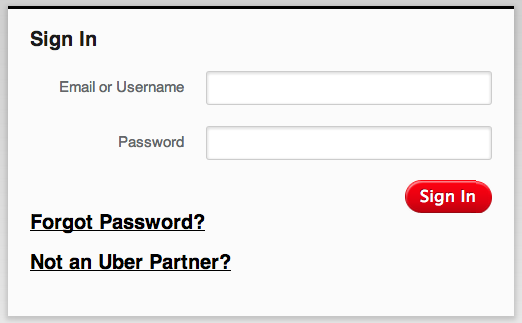
1. Enter in your username and password. Your username is likely your email address, and the password is what you signed up with. Forgot your password? Reset it at http://t.uber.com/password.
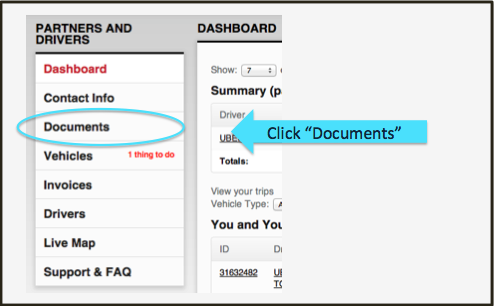
2. Select Documents from the side-bar
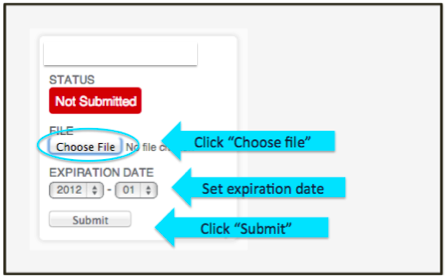
3. Upload each document that has a status of Not Submitted:
4. Provide your bank details
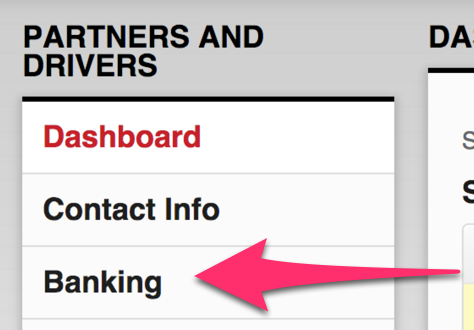
It’s important that we have stored your correct bank details, so please update your details by logging into http://partners.uber.com and selecting the Banking tab:
5. Tell us you’re ready to go!
That’s it, you’re ready to drive! Questions? Visit help.uber.com.
You download the Uber Partner app onto your own phone, and you will receive a download link for the app once you are successfully activated.