Less Downtime
How it works
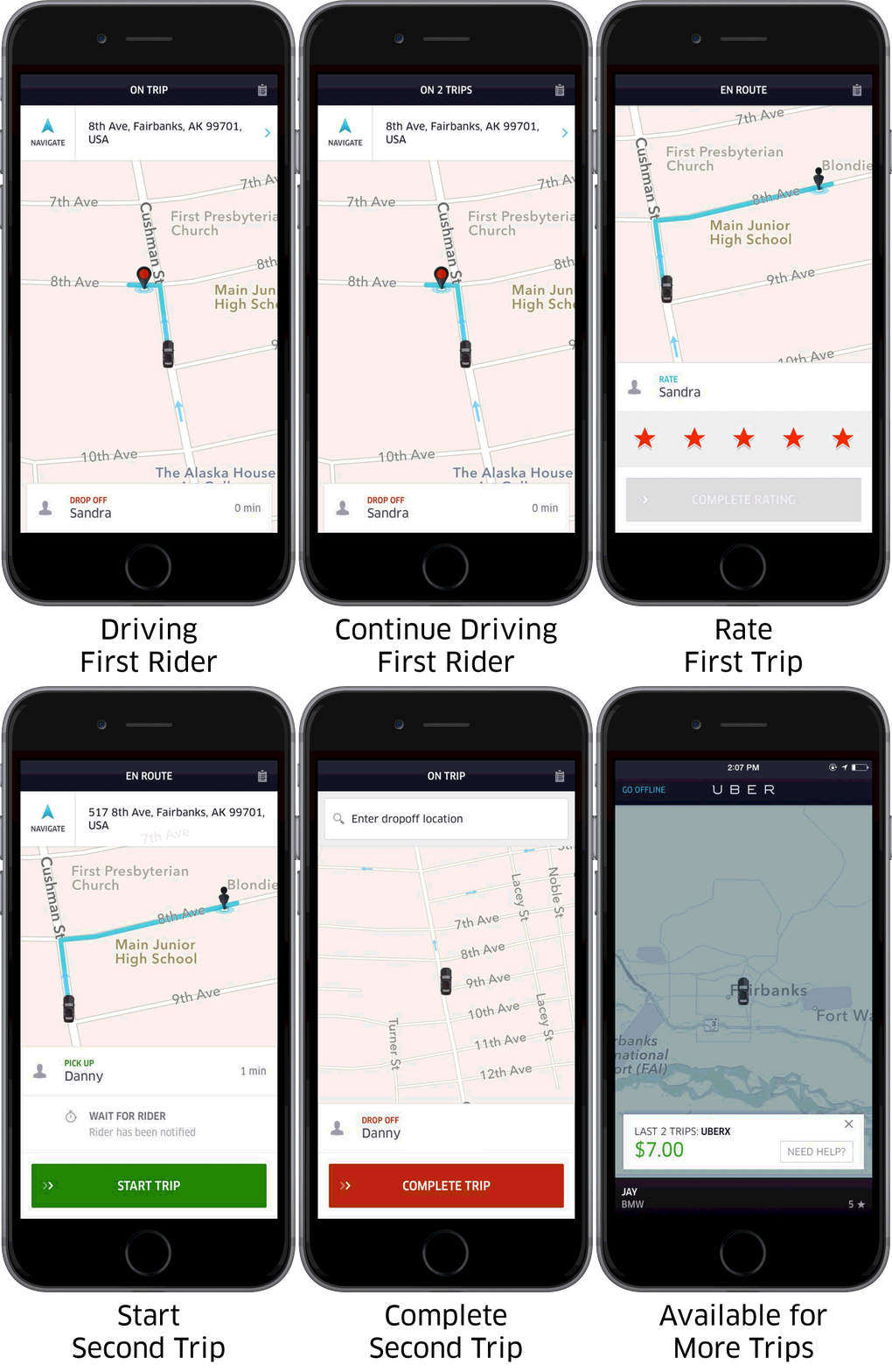
Earlier this year we introduced a new feature in the Uber Partner app that allows driver-partners to receive and accept the next trip request before they have dropped off the rider currently in their car. This allows driver-partners to skip the wait between trips and go straight to their next ride, meaning more time driving and earning!
How it looks
When driver-partners are online and ‘On Trip’ with a rider in their car, the rider has usually entered their destination into the Uber app (or the driver has entered it for them). As the trip nears the current rider’s drop-off location, driver-partners can receive requests for their next trip. This incoming request will appear at the top of the screen so that you can still see the map/navigation for your current trip. All you need to do is tap the circle to accept the next trip and you’ll be automatically directed there after you drop off your current rider.
Frequently Asked Questions
How do I start getting requests before my trip is over?
As long as the rider has entered their destination into the Uber app (or you have helped them do so), you will be automatically eligible to receive requests near your rider’s drop-off location.
What if my rider(s) have multiple destinations?
No problem! With this method of receiving trip requests, you just need to know in advance whether the entered destination is the final stop – so be sure to ask your rider at the beginning of the trip. If it’s not the final stop, you can ignore all the incoming trip requests until the final destination is entered – or, if you feel confident with the way, have riders put their final destinations in right away to prevent requests from coming in too early.
Will this impact my acceptance rate?
Declining a trip request that comes when you’re nearing the end of your current trip does count the same as a declined request any other time you’re online. However, we don’t expect this new feature to impact partners’ acceptance rates significantly. The percentage of trips where riders request multiple destinations is very small, so we don’t anticipate ignoring a trip request in these situations impacting your acceptance rate significantly. Additionally, if you need to take a break, you can click “Go Offline” while you are still driving and this will pause any incoming trip requests.
How do I take a break?
We understand there will be times when you’re not immediately ready to accept another trip request, such as when you need to take a break or finish up for the day. You can click “Go Offline” while you are still driving and this will pause any incoming trip requests. This way you can finish the current trip and then take a break.
Will the next rider know that I’m on my way to them?
Yes! The next rider will receive a notification in their app to let them know that you are just completing another trip nearby, and will be heading to pick them up once you have dropped off your current rider. The rider will also see an estimated time of arrival (ETA) so they know approximately when to expect you.
How can I call the second rider?
To contact the second rider:
- Tap the Clipboard image on the top right-hand corner of your app
- Tap the person icon to show a drop down menu
- You can contact both current and upcoming riders.
You can also cancel parts of the trip here too.