Have you ever been late for a meeting because you were circling for 30 minutes looking for a parking spot? How about being underprepared because you hadn’t had sufficient time to run through your talking points? This is where Uber comes in handy! Request a ride, arrive at your destination not having to worry about your travel.
Business Profiles are here for you!
All you have to do is input all your company data on our website, after which, with every trip summary you will be able to download your VAT invoice.
How do I set up my Business Profile?
- Login at riders.uber.com
- In the “Tax Profile” tab fill in all company data (name, NIP, address)
- Go to www.uber.com/business/profiles and enter your Uber account email
- Login to your Uber app and choose the Settings tab
- Go to “Profiles” and input the email to which you want to receive your summaries
- Attach a payment card to your profile (cards already added or add a new one)
- Declare whether you want weekly or monthly trip summaries
- Download invoices in the “My Trips” tab at riders.uber.com
Happy riding!

New feature alert!
You can now decide between filling out your personal and business tax info. Based on your declaration of which profile you are riding on, we will generate an invoice with your data input at BUSINESS TAX INFO or PERSONAL TAX INFO.
Before your ride
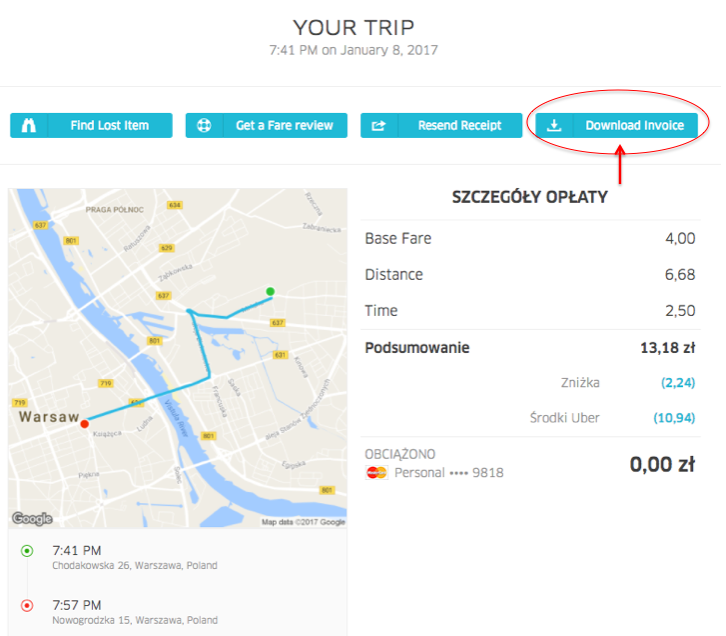
When requesting a ride – in the top right corner of your screen you can decide on which profile you will be riding (personal or business). You can download your invoice after every trip at riders.uber.com:
Business Profiles are a perfect solution for individual business owners as well as companies employing up to 50 employees. They enable not only the unification of costs but also do not require additional effort from users. This functionality is completely free and makes your business rides smoother than ever.