How Uber Built an Agentic System to Automate Design Specs in Minutes
March 11 / Global
Introduction
The Uber Base design system serves thousands of engineers, and every component they ship depends on specs that are accurate, complete, and current. When those specs fall behind, engineering builds from assumptions instead of definitions, which causes inconsistencies and tech debt. At that scale, documentation becomes a dedicated workstream that still struggles to keep pace. This blog describes how Uber’s design systems team uses AI agents and Figma Console MCP to generate up-to-date component specs in minutes instead of weeks.
Background
uSpec is an agentic system that connects an AI agent in Cursor® to Figma® through the open-source Figma Console MCP. The agent crawls your actual component and sub-component structure, compiles that data with any additional context you provide, and generates finished spec pages directly in your Figma file in minutes. The entire pipeline runs locally, so no proprietary design data ever leaves your network—a requirement for an organization like Uber.
I’ve spent years building and teaching others how to manually create component specs. At Uber, the complexity compounded in different ways: 7 implementation stacks, density variants across each, and strict accessibility requirements. The work compounds, but the process stays the same: a designer manually producing page after page of structured documentation in Figma.
Last year, I presented a framework for creating detailed specs at scale inside of Figma—the methodology, the templates, and the process that made it repeatable across hundreds of components.
The response made clear that this wasn’t just an Uber problem. Designers and design systems leads from across the industry reached out asking how to replicate the process, how to scale it, and how to maintain it. Then the Figma Console MCP arrived and created an opportunity that didn’t exist before: a way to connect an AI agent directly to Figma without sending proprietary design data through external APIs, and a way to automate the entire spec creation process end-to-end.
The Enterprise Documentation Problem
Consider a single component, a button. Designers need behavior specs and usage guidance to use it correctly within the system. Further, engineers need a spec to build it. A complete component spec includes (but not limited to):
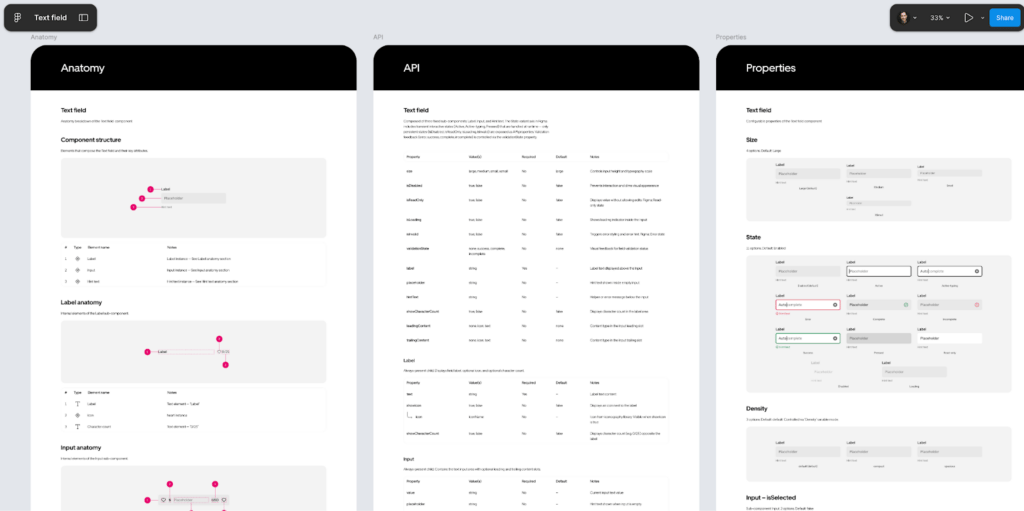
- Anatomy: Numbered markers identifying each element of a component with an attribute table
- API: Every configurable property, its values, and defaults
- Properties: Variant axes and boolean toggles with instance previews
- Color annotation: Each element mapped to its design token across states
- Structure: Heights, padding, and spacing across size and density variants
- Screen reader: Accessibility properties for VoiceOver, TalkBack, and ARIA
That’s one spec with 6 sections, and only the implementation side. The screen reader section alone covers 3 accessibility APIs, each with hundreds of properties: VoiceOver modifiers and traits, TalkBack semantics, and ARIA roles and states. Writing it correctly means selecting the right values from platform documentation. Designers spend hours cross-referencing references, and a single wrong property means a broken experience for assistive technology users.

Now multiply across every component in your system. Uber’s design system has hundreds of components shipping across 7 implementation stacks: UIKit™, SwiftUI™, Android® XML, Android® Compose, Web React®, Go, and SDUI. Each component spec serves as the single reference for all of them. The math is unforgiving: hundreds of spec pages that all need to stay accurate as the system evolves. Manual spec writing is slow, inconsistent across authors, and drifts out of date the moment a component changes.
At this scale, documentation becomes a dedicated workstream that still struggles to keep pace.
From Figma Link to a Finished Spec
The process reduces the entire workflow to 2 steps: sharing a Figma link and context, and the agent reading the Figma file and rendering the spec.
Step 1: Share a Figma Link and Context
First, open Cursor and reference an agent skill with your Figma component link. Add context about states, variants, or platform-specific behavior that the agent can’t infer from the design alone.

Step 2: The Agent Reads Your Figma File and Renders the Spec
Next, the AI agent connects to your Figma file through the Figma Console MCP, extracts component structure, design tokens, variables, and styles, then maps the parent-child relationships between layers and sub-components to render a finished spec page directly in your Figma file. No intermediate steps, no manual formatting—the agent goes from reading the component to placing the completed documentation in one pass.
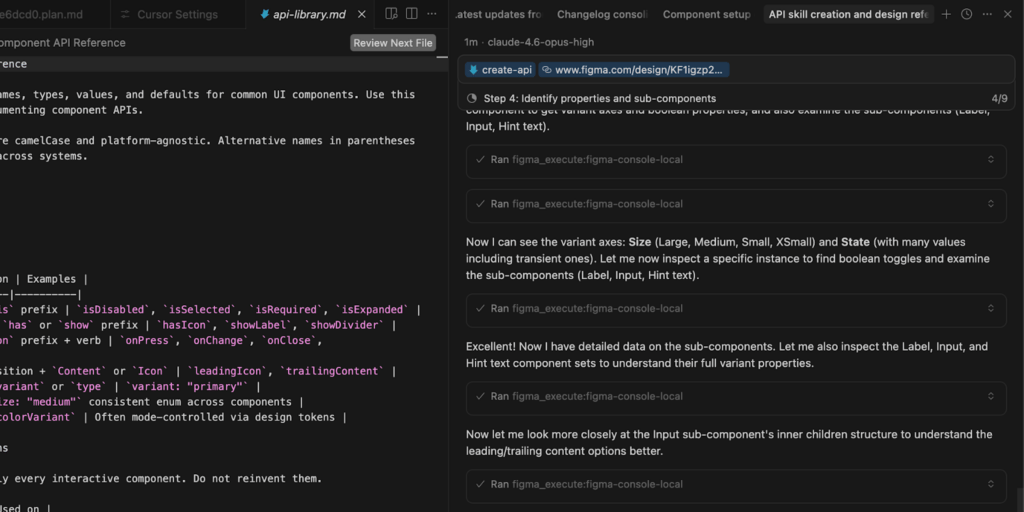
Each section of the spec has a dedicated agent skill:
| Skill | What it generates |
|---|---|
| Anatomy | Numbered markers on a component instance with an attribute table |
| API | Properties, values, defaults, and configuration examples |
| Properties | Variant axes and boolean toggles with instance previews |
| Color annotation | Token mapping for every element and state |
| Structure | Dimensions, spacing, and padding across variants |
| Screen reader | VoiceOver, TalkBack, and ARIA in a single pass |
The agent reads real data from your Figma file. Token names, variant axes, variable modes, and component properties come directly from your design system.
How It Works Under the Hood
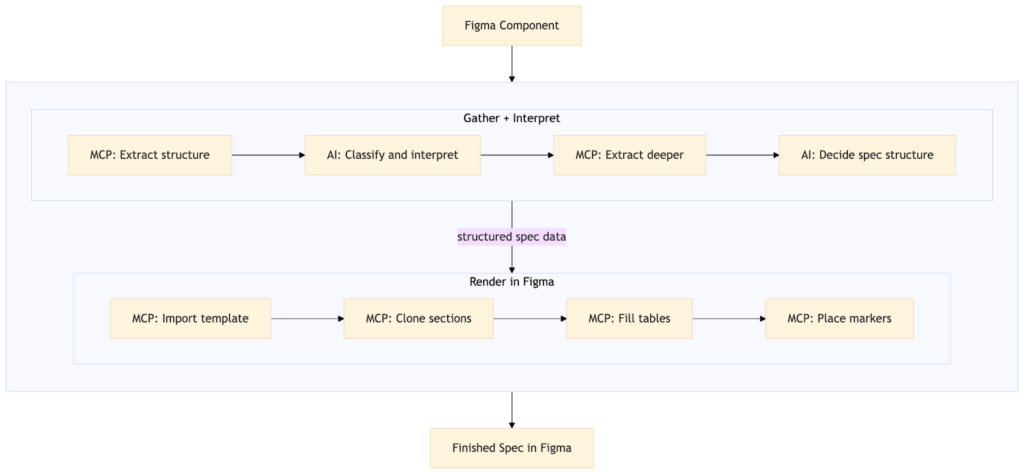
Two layers work together: agent skills that carry the spec-writing expertise, and an MCP bridge that gives the agent direct read-write access to your Figma file.
Agent Skills Encode Domain Knowledge
Each skill loads its own instruction file with validation rules, structured schemas, and reference documentation. The screen reader skill, for example, loads platform-specific accessibility property references (VoiceOver modifiers, TalkBack semantics, ARIA roles) before analyzing the component. The agent doesn’t guess at property names—it selects from documented APIs.
The Figma Console MCP Connects the Agent to Figma
The Figma Console MCP connects the agent to Figma through a local connection to Figma Desktop. Each skill specifies which data to extract. A color annotation relies heavily on token values, while a screen reader spec relies more on screenshots and component structure. The MCP connection enables something that screenshot analysis can’t: the agent crawls the component tree, identifies sub-component structures and slot-based compositions, detects when designers have used variables in place of variants, and translates Figma’s internal modeling patterns into clean API documentation.
The Agent Renders Directly in Figma
Once the agent has built a complete picture of the component and its connections, it imports the matching documentation template from your library, detaches it, and populates it—filling text fields, cloning sections, building tables, and placing markers—all through the MCP. There’s no intermediate output. Programmatic plugins can extract component data from Figma, but they can’t interpret what that data means. uSpec combines both: AI judgment where interpretation matters—classifying accessibility semantics, selecting the right token mappings, deciding how to structure a spec—and programmatic scripts where precision matters, rendering the result directly in Figma.
Why This Matters at Enterprise Scale
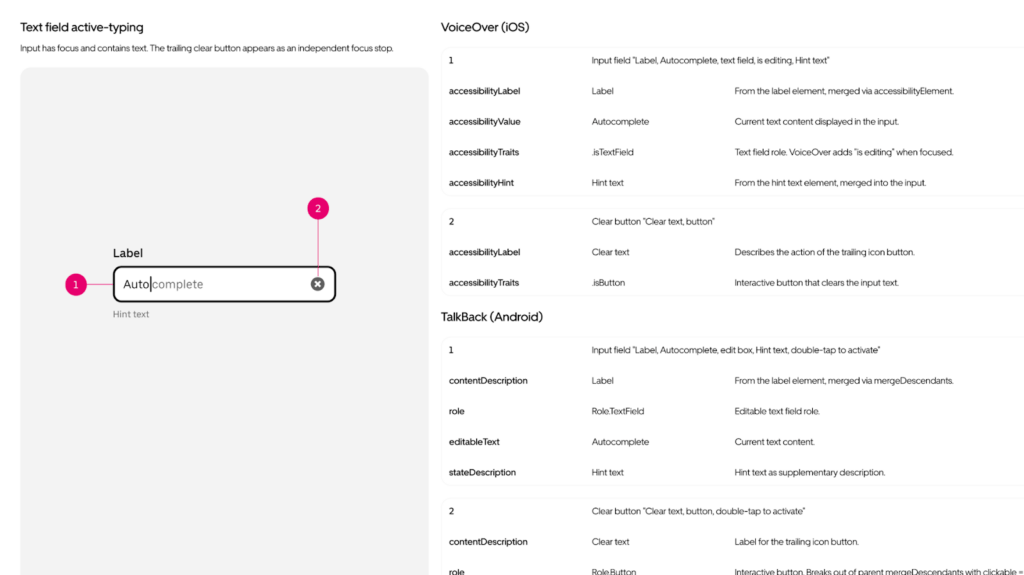
This works at Uber’s scale because of 6 properties:
- Security: The entire pipeline runs locally. The MCP connects to Figma Desktop over a local WebSocket, the agent runs in Cursor on your machine, and rendering happens directly in Figma through that same local connection. No cloud API, no proprietary design data leaving your network. At Uber, this is what makes AI-assisted documentation possible in the first place: nothing leaves your machine.
- Consistency: Every spec follows the same structure. Structured schemas and templates enforce it, not authors.
- Speed: A full screen reader spec covering 3 platforms generates in under 2 minutes.
- Accuracy: The agent reads real token names and variant values from Figma. No transcription, no transcription errors.
- Multi-platform: One prompt generates iOS, Android, and Web accessibility specs in a single pass.
- Maintainability: Changelogs update directly in Figma via MCP with a single prompt.
A system with hundreds of components that previously required months of spec-writing can generate complete specs in days. That’s how Uber’s design systems team now approaches component documentation—and it frees designers to focus on the work that automation can’t replace.
The Open-Source Foundation
uSpec depends on an open infrastructure layer. None of this would exist without the Figma Console MCP, built by Southleft and released as open source. It’s the bridge between an AI agent and Figma. The infrastructure layer that made the application layer possible.
Open-source infrastructure matters here because the problem isn’t unique to Uber. Every design systems team at scale faces the same documentation bottleneck, the same drift, the same trade-off between coverage and accuracy. When infrastructure is shared, teams build on each other’s work instead of reinventing it behind closed doors.
We spoke with TJ Pitre, CEO of Southleft, about why they chose to open-source it.
| “We built the Figma Console MCP because we needed it for our own enterprise engagements. When we decided to open source it, that was about paying back the community that made us who we are. The tools are ephemeral, but the approach isn’t. When someone like Ian takes what we built and creates something we never could have planned for, that’s passing the torch. That’s the whole point.” TJ Pitre, CEO of Southleft |
The MCP gave us something we couldn’t have built alone: reliable, local access to Figma’s component data, variables, and styles from an AI agent. The foundation layer and the application layer depend on each other.
What Comes Next
Design is moving closer to code. As tooling evolves, it’s becoming less unusual to see designers submitting pull requests, fixing issues directly in code, and working in the same systems engineers use. The spec has always separated design intent from engineering implementation. With automation, that separation is shrinking.
The system is still evolving. Ideas like drift detection, code-to-spec generation, and new spec types are already on the roadmap. We’re continuing to develop uSpec and looking forward to seeing where it goes.
Conclusion
Sharing this work publicly is a deliberate choice. At Uber, we believe that when a process works, making it available creates more value than keeping it proprietary. The entire process is documented at uSpec.design and is open-source on GitHub®.
Acknowledgments
Thank you to Joann Wu and Samira Rahimi for supporting this effort from a design leadership perspective.
Thank you to TJ Pitre from Southleft for his open-source project Figma Console MCP that serves as the infrastructure layer for this work.
Thank you Sarah Pritchett for edits.
Cover Photo Attribution: Image created by Alfonso Perez.
Android® is a registered trademark of Google LLC.
Cursor® is a registered trademark of Anysphere, Inc.
Figma® is a registered trademark of Figma, Inc.
GitHub® is a registered trademark of GitHub, Inc.
React® is a registered trademark of Meta, Inc.
UIKit and SwiftUI are trademarks of Apple, Inc.

Ian Guisard
Ian leads the design of Uber’s Base design system, building foundations for scalable, cohesive product experiences.
Posted by Ian Guisard