
After a 5 year on-demand pilot, Uber and the Massachusetts Bay Transportation Authority (MBTA) have renewed their shared commitment to support The RIDE customers’ ability to easily move around their community.
On July 1, the MBTA’s RIDE pilot program will formally become The RIDE Flex program. Along with this name change, we’re making a few additional updates to the program.
Here’s what you need to know
- To continue receiving the subsidy, it’s critical that you re-enroll. Riders who do not re-enroll will lose their subsidy on July 1, 2021.
- Upfront fares are changing. Beginning on July 1, eligible riders will pay $2 up front for any UberPool trip, and $3 up front for any UberX or Uber WAV trip. The MBTA will continue paying up to $40 per trip. You will be responsible for any amount remaining, including tip, above $43.
- If you are already enrolled in the program, you’ll continue to pay $2 until July 1, 2021. There’s no penalty for re-enrolling early.
- Eligible riders will be allocated 2, 10, 20, 30, or 40 trips per month. The MBTA will determine trip allocations based on typical RIDE usage. Returning customers, please note: your trip allocations will be assessed upon your signing up for the new program, and no allocations will be reduced—customers will receive either the same number of trips or an increased number.
- In addition to receiving the same Uber on-demand service you’re now familiar with, when you sign up for The RIDE Flex program, the MBTA will be able to schedule the trips you book through TRAC to be dispatched to Uber vehicles.
How ensure your Uber Profiles account remains active
- Click on this link and fill out the form to re-enroll. Just a reminder, re-enrolling early will not mean you have to start paying $3 per trip immediately. You will continue to pay $2 per trip until July 1.
- On July 1, look for an invitation from Uber for Business in your inbox. If you don’t see the invite and have checked your spam filter, please reach out to your program administrator. Once you’ve ensured that they have your correct email address, ask them to send the email again.
- Use the link in the email to accept your invitation to the MBTA paratransit program, RIDE Flex.
- Open the Uber app when you’re ready to ride. After you select a destination and ride option, toggle on your agency profile (above the Choose UberX button).
Before taking your first trip, you’ll need to confirm a secondary payment method. You’ll then be able to take trips within the MBTA RIDE service area until you reach your allotted number of trips each month.
Once you accept the invitation to the RIDE Flex program sent by email from Uber for Business, you’ll be automatically enrolled in the program. If you have a smartphone, you’ll receive a notification that your RIDE Flex profile is ready.
How to join The RIDE Flex program
- Download the Uber app and create your account
If you don’t have Uber yet, download it to your iOS or Android device and follow the in-app prompts to create an account. Already have the Uber app? You’re all set. - Request to join the pilot program
In order to join the pilot, you must complete this form. When completing, be sure to include the email address that is connected to your Uber account and have your RIDE ID number handy. - Request your ride
Once your application has been processed, you will receive a welcome email from Uber with everything you need to know to get riding!
How it works
|  |
What to expect
Request your ride
Choose between the UberX, UberPool, and WAV options in the app. UberX offers riders a 4-door sedan. UberPool offers riders a low-cost, curb-to-curb shared ride in a 4-door vehicle, with up to three other people at a time. You may request an UberPool for two people, including yourself. When traveling with a service animal on UberPool, please select two seats.* WAV offers riders who travel with non-folding, motorized wheelchairs access to drivers with wheelchair accessible vehicles. Note that you can find the WAV option if you swipe to the “More” section of the Uber app.
You’re covered
The first $2 of UberPool trips and the first $3 of UberX and WAV trips will be charged to the payment method tied to the rider’s Uber account, and the MBTA will be covering up to an additional $40* of each fare. Anything over that amount will be automatically billed back to the rider’s payment method via the Uber app. Riders will be notified of the total amount you owe when you place your trip request.
When and where
All trips must occur between 5am and 1am in the designated service area. This area is the same as the service area for The RIDE.
Track rides
After you request a trip, you will be shown the number of trips remaining, including the current trip, on the request screen.
*Please note that in some cities you may be automatically charged an additional fee for selecting more than one seat. In the event you were charged for an additional seat for a service animal, please let Uber know and the additional fee will be refunded.

Frequently asked questions
- When will the program be available?
In order to participate, riders must complete the form above. After the application has been accepted, Uber will send a welcome email with instructions on how to get moving within 1-2 weeks.
- How will I know how much I'm paying?
When requesting a trip through this program, riders will be required to enter the address of their end destination. Upon entering that end destination, you will be provided only with the total trip fare that you will personally be responsible for paying. This will exclude the the $40* maximum per trip the MBTA is subsidizing (after you cover the first $3 of the UberX or WAV trip or the first $2 of the UberPool trip).
- I don’t have a smartphone, can I join The RIDE Flex program?
Stay tuned! We’ll be announcing a partnership with GoGo Grandparent soon, which will allow riders without smartphones to participate in Ride Flex.
- How do I create an Uber account?
Please refer to this Uber Support article for steps to take to create your account.
- What do I do if I have a question or feedback to provide?
Uber’s dedicated support team is always ready to help. To reach to them with questions about this pilot, please visit them here.
- How many rides do I get per month?
Each rider is allotted a limited amount of rides per month. Please reference your welcome email or refer to the Rider Passes section within the left sidebar menu in the app to see your trip limit for the program.
- Can I use my RIDE payment profile to pay for my Uber rides on the On-Demand Paratransit Pilot program?
Unfortunately, no. The RIDE and Uber are billed separately. Please note that you will need to add a payment method to your Uber account. Uber does not currently have the ability to link to payment methods that are currently on file for MBTA RIDE users.
- Why do I need to sign up for the pilot and then also create an account with Uber and download their app?
Signing up for the pilot expresses your interest in joining the pilot. To use the pilot, you must have an account with either company and have downloaded their app.
- How do I know if I'm eligible for this program?
For any questions you may have on eligibility, you may visit the MBTA's website to learn more.
(opens in a new tab)">Learn more > - Am I able to use Uber if I am blind or low-vision?
With VoiceOver iOS and wireless braille display compatibility, the Uber app makes it easier for riders who are blind to get from A to B at the push of a button.
(opens in a new tab)">Learn more > - Will you be offering Wheelchair Accessible Vehicles (WAVs) as part of The Ride Flex program?
Yes. Riders who are a part of this pilot will have the choice between the uberX, uberPOOL, and uberWAV options on the Uber app. Drivers who accept uberX and uberPOOL ride requests are expected to accommodate folding wheelchairs to the maximum extent possible. Drivers who accept uberWAV ride requests possess vehicles that can accomodate motorized, non-folding wheelchairs.
- What are your policies as they are related to persons with disabilities?
You can view a full overview of our policies at accessibility.uber.com or through the link below.
(opens in a new tab)">Our policies > - What is Uber's service animal policy?
State and federal law prohibit driver-partners using the Uber Driver App from denying service to riders with service animals because of the service animals, and from otherwise discriminating against riders with service animals. As explained in Uber’s Non-Discrimination Policy, driver-partners who engage in discriminatory conduct in violation of this legal obligation will lose their ability to use the Driver App. Please read more about Uber's Service Animal Policy (U.S.) here.
- The fares seem to fluctuate. What is this dynamic pricing?
Uber's fares are dynamically priced. This means that the fare a rider sees is based on variables subject to change over time. These variables include (but are not limited to) the estimated time and distance of the predicted route, estimated traffic, and the number of riders and drivers using Uber at a given moment. Dynamic fares help ensure that riders can always receive a quick pickup by matching the supply of drivers with the demand of riders. Dynamic pricing may cause fares to temporarily increase. This encourages more drivers to get on the road and head to areas of the city where demand for rides is higher than drivers' ability to accommodate all the ride requests happening at any moment. When fares are higher due to dynamic pricing, riders will see the actual fare before they request a ride.
- What is UberPool?
UberPool is a shared ride and the most affordable way to Uber. It is up to 50% cheaper than UberX—no matter what. The exact discount varies depending on time of day. Commuting hours and weekend nights see the highest discounts. Your ride will match you with another rider going your way so it shouldn't be too inconvenient.
- Why was my trip more than $2?
You are responsible for the first $2 of UberPool trips and the first $3 of UberX or WAV—the MBTA will cover the remainder of the trip up to $40*. In the event that your total trip cost is over $42 for UberPool or $43 for UberX or WAV, you will be responsible for that additional balance. You will always be shown the amount that you are required to cover within the app before requesting a ride.
- How do I know that my account has been activated?
Visit the Ride Pass tab on the left sidebar menu for more information. If you have activated your account, you will see your remaining trip count and savings, if you haven't yet activated your account, you'll be prompted to do so.
- Where did the Popular tab go?
There is no longer a Popular tab that you need to scroll to in order to request through this program. You can request uberPOOL or uberWAV in the app with the MBTA-subsidized rate. Your app will say "Flat Fare applied" on the trips subsidized by the MBTA.
- Why can’t I activate my Pass?
Subscription Passes are no longer part of Uber’s program with the MBTA Ride. Once enrolled in the Uber for Business Account, you will no longer have to activate your pass each month. Program details can now be found under “Wallet” in the Menu section of your Uber application.
- How do I know how many rides I have left?
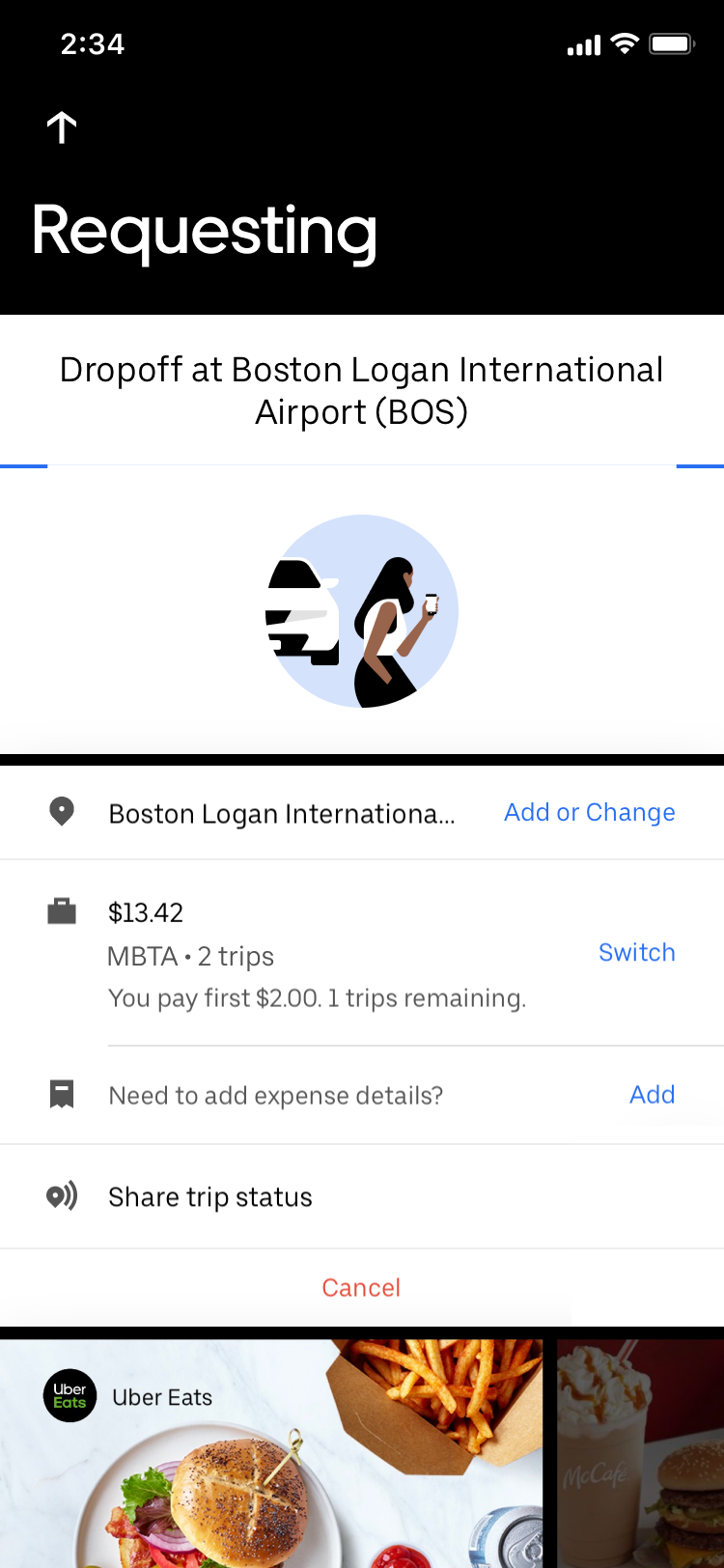
After you request a trip, you will be shown the number of subsidized rides remaining on your Profiles account for that month. Please see the image for an example of where to find the trip count. - I have enrolled in the program, but I’m not seeing the discount.
Riders will need to confirm a secondary payment method on their MBTA Profile before requesting their first trip. This may be done by following the below steps:
- Go to the menu on the upper left corner of the app.
- Click on the “Wallet” section
- Scroll down to “Ride Profiles” and select Massachusetts Bay Transportation Authority
- Under “Secondary Payment”, select your preferred payment method.
- I am not receiving the enrollment email.
- Check your spam filter for emails from Uber. Make sure to whitelist emails from noreply@uber.com
- Make sure you sign in with your existing account credentials, do not create a new account. If you don’t have an Uber account, you’ll need to create a new one before you can link to the MBTA account.
Please note that the MBTA reserves the right to limit or cancel this pilot program at anytime.
*The subsidized amount, number of subsidized rides, available Uber products and rider copays are determined by the MBTA. Changes to the program are at the discretion of the MBTA.
Posted by Uber Transit