Best Practices for Unit Testing in React Version 16
With the introduction of React version 16 in 2017, hooks now make it possible to reuse stateful logic between components. However, with these new features, engineers must revisit previously defined conventions for using React. Unit testing is one of these practices.
The Web Tools Platform team’s mission is to create performant web visualizations that enable teams at Uber’s Advanced Technologies Group (ATG) to build better tools for self-driving vehicles and, in part, produce open source software.
As a summer engineering intern on Uber ATG’s Web Tools Platform team, I explored and defined new best practices to test our various React components after my team heavily altered some of the logic in our application to visualize self-driving vehicle data.
While implementing functional components with hooks, our team noticed a lack of documentation on React version 16 unit testing available online. In the process, we determined various best practices for unit testing functional components with hooks. We hope other engineering teams will find these best practices useful and can also apply these approaches to their unit testing.
Basic setup for testing components
When I began as an intern, the Web Tools Platform team had just finished adding to and refactoring various components in an application to visualize autonomous vehicle data. We needed to test those alterations and new pieces of logic to ensure particular components still worked as expected. During this evaluation, we compiled best practices and procedures for testing React version 16 components.
To start, we used Enzyme to create shallow renderings of components that we could then compare to snapshots.

Creating these renderings is a two-step process:
- Define a wrapper around the shallow rendering of a component. Include props if they are required.
- Create a basic snapshot test to ensure that the JSX returned is correct and consistent with what is expected. To perform a snapshot test, render a component, take a snapshot of the JSX output, and then compare it to a reference snapshot file stored in the test. The snapshot test fails if the two snapshots do not match.
Although snapshots provide an overview of what a component renders, it is still necessary to test the components’ internal logic.
Testing the logic of class components
Testing the logic of class components in React version 16 is fairly straightforward. Developers can test class component logic to access state variables and props in order to reference the variables of a particular class context.
As such, the first step to testing the logic of a class component is to retrieve the wrapper’s underlying class instance.

Testing internal functions
In general, we tested the logic of internal functions in a class component by ensuring that React altered values as expected after calling them. Our team tested specific functions that altered a state variable given that certain conditions held. We evaluated whether or not the value of the variable changed after the function was called.
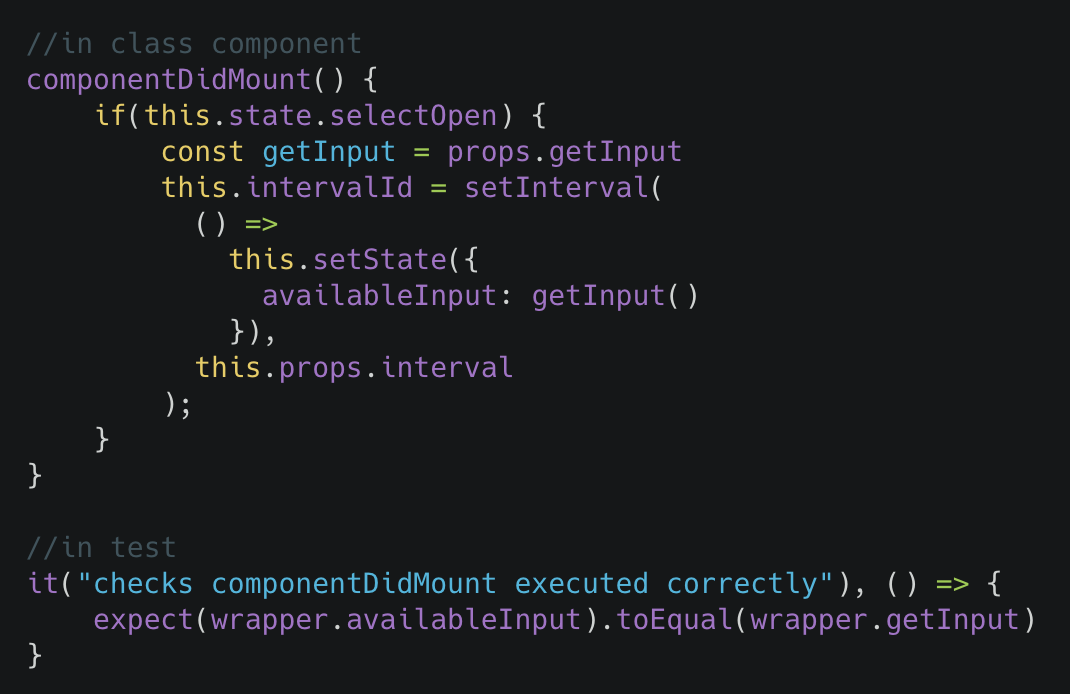
Testing whether componentDidMount executed correctly
In a class component, any other function besides render is optional. However, in the above example, the component includes a componentDidMount method, which sets up an interval to periodically update the value of a state field until the component is unmounted. To test this functionality, we checked if componentDidMount correctly set the state variable to a function.
Note that we did not directly test what the value returned by the function is or whether it is correct. This test only ensures that the logic of the immediate function, componentDidMount is correct; to evaluate the logic of the function, one would need to run a separate test to do so.

Testing whether componentWillUnmount executed correctly
If it is defined, componentWillUnmount is called immediately before a component is unmounted from the DOM (Document Object Model) element it was originally mounted to. Often, componentWillUnmount clears the component’s interval so that the setState of the state variable does not update after each interval as part of cleanup. In our testing, we checked to make sure that after componentWillUnmount is called, the wrapper has an undefined intervalId, which demonstrates that it has been cleared. If the wrapper’s intervalId is present, componentWillUnmount may not be working properly.
Functional components
Unlike class components, we cannot test functional components using instances. Since a functional component is inherently just a function, there is no way to instantiate one and then directly call its variables or functions.
To overcome this issue, our best practice is to separate more complex segments of logic within the functional component and rename them as their own methods in other files outside of the immediate component.

Testing internal functions
The example, above, leverages the functional component version of onOpen.
To address this, we moved the bulk of logic from onOpen to the Utils file and is called by exporting the newly made function and calling with the state variable selectOpen and its set method. In this way, it becomes possible to test the logic of onOpen.
When we test functional components such as onOpen, we have to check to see if localSetSelectOpen was called. When evaluating class components, however, we can determine the value of the state variable immediately after modifying it.

Another example of testing internal functions of a functional component is onSelectChange. Originally, the function took in the parameters and determined which course of action to take from a set of conditional if statements. Now, onSelectChange takes in params and proceeds to call onSelectChangeLogic which is an exported function from Utils, depicted above. Thereby, making the testing of onSelectChange’s original logic possible as a separate, accessible function.

In both of our tests, we call onSelectChangeLogic with a set of parameters that include mocked functions. To ensure that the function works as expected, we check if a particular mocked function was called during execution.
Using mocking hooks and functions
Since we incorporated shallow rendering in our tests and wanted to test only specific components rather than any additional child components, we took advantage of Jest’s mock functions to write tests.
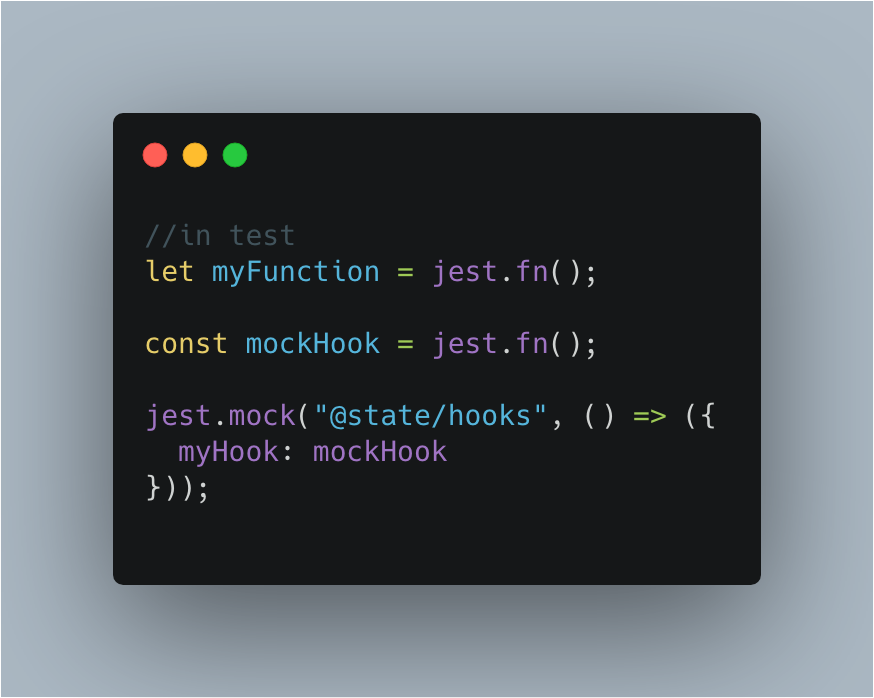
In our test, it becomes necessary to mock myFunctionandmockHook to be able to call child components directly. To check if conditionals one and two don’t hold in the previous test above, we pass in the mocked parameter function myFunction. Since our test only checks if myFunction is ever called, we don’t need to actually implement it, but rather, just mock myFunction’s behavior.
When we check if conditional two holds in the previous test above, a hook is called. As such, we have to mock the hook separately because React doesn’t pass it like the parameter example. Fortunately, Jest offers a way to mock hooks and their return values. In this way, we are able to mock a hook as mockHook, a mock function we have locally.
We found that in order to retain a local variable’s reference, we needed to assign a mock hook to it. This is because jest.fn() returns a new, unused mock function. If a hook function is assigned to jest.fn() directly, it becomes impossible to track its reference per call when testing it. In contrast, with a mock hook attached, we can easily monitor a local variable.
When we set myHook to some local variable, we learned that we needed to prefix the variable’s name with mock (case insensitive). This is because jest.mock() cannot reference any out-of-scope variables when mocking an external method. However, we realized we could use create local variables to keep track of certain mock functions as long as we used the special keyword “mock” at the beginning of the related function name. Prefixing the variable with “mock” maintains a clear scope of what a mocked item should be able to access.
Mocking useEffect
useEffect, a React internal hook (unlike the previous example), is called directly after rendering and after every update to perform side effects. In turn, it can also be tested in a way similar to custom made hooks.

This is the functional component version of the componentDidMount and componentWillUnmount examples from the class component above. This version uses the same testing methods as in those instances, except with useEffect. In order to test the logic of what happens in useEffect, we test onEveryInterval separately when it’s exported from Utils.
Key takeaways
Unit testing is a vital tool when building upon a large application or project because it allows engineers to test whether the addition or manipulation of a particular structure in their project caused another to break. In order to unit test with React version 16, my team at Uber ATG with used Enzyme to create wrappers around shallow renderings and Jest to mock variables and hooks.
In our experience, testing class components with React version 16 is relatively simple. We simply ensure that internal functions operate as expected by retrieving the instance of a wrapper’s underlying class component.
Functional components, on the other hand, are inherently functions, and as such, they cannot be instantiated. To test these components, we have to break apart their internal logic and create separate methods from it. We then test these methods using Jest.
We hope other React developers find these best practices helpful, too!
Learn more about the Uber Engineering intern experience by checking out other articles from our interns:
-
- The Uber Engineering Internship Experience: European Edition
- Aarhus Engineering Internship: Building Aggregation Support for YQL, Uber’s Graph Query Language for Grail
- Interning at Uber: Building the Uber Eats Menu Scheduler
- Out of the Classroom: A Snapshot of Uber’s Summer 2018 Interns
- My Site Reliability Engineering Internship Experience with Uber
Anat Kleiman
Anat Kleiman was a full-stack software engineering intern on Uber ATG's Web Tools Platform team in 2019. She is currently a senior at Brandeis University double majoring in Computer Science and Economics.